
Barcodes show up in almost every part of daily life—from grocery packaging to airline tickets and even digital payments. The two most common families are 1D (one-dimensional) barcodes and 2D (two-dimensional) barcodes such as QR codes. Both store data, but they differ in how they look, how much they can hold, the scanners they need, and where they shine.

What is a 1D Barcode?
A one-dimensional (1D) barcode is the traditional pattern of parallel lines and gaps used to encode data in a single direction. Data is encoded horizontally, so adding more characters makes the code physically longer.
Examples
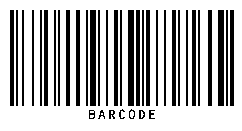
A 1D barcode, also known as a linear barcode, is the oldest and most widely used form of barcode technology. It represents information through a pattern of vertical black lines and white spaces, making it easy for a 1D scanner (usually laser-based) to read the data. These barcodes are very popular in retail stores, library systems, healthcare, and warehouse management because they are low-cost, fast to print, and simple to integrate into inventory systems. Typically, a 1D barcode can store 20–25 characters, which makes it ideal for encoding product IDs, prices, or serial numbers. However, compared to 2D barcodes such as QR codes, the storage capacity is limited, and they cannot contain detailed information like website URLs, long text, or multimedia links. This is why many businesses today use 1D vs 2D barcodes together depending on their needs.
When looking at 1D vs 2D scanners, the main difference comes from the scanning technology itself. A 1D barcode scanner requires direct line-of-sight and close-range scanning, while a 2D barcode scanner can capture codes from multiple angles, even if the code is damaged or poorly printed. Another interesting point is that some people confuse the term “1D QR code”, but in reality, QR codes are always 2D barcodes, since they store information in both horizontal and vertical directions. For businesses that only need quick product identification, billing, or stock management, the 1D barcode remains a reliable, affordable, and efficient choice. On the other hand, companies needing higher security, more storage, or customer-facing features often shift toward 2D solutions.
check it out: https://urllink.site/qrcode/1d-bar-code.phpKey features
- Data format: usually numbers or short alphanumeric strings.
- Capacity: practical range ~20–25 characters (some symbologies allow more).
- Scanning: typically read by laser scanners from short range.
- Structure: variable-width vertical bars and spaces.
Where it fits
- Retail item IDs (e.g., UPC on consumer goods)
- Warehouse bins and shelf labels
- Library and basic inventory systems
Advantages
- Low cost: very cheap to print on labels and packaging.
- Fast scanning: efficient for high-volume retail and inventory checkouts.
- Standardized: globally recognized formats like UPC and EAN are universal.
- Simple integration: works with existing POS and warehouse systems.
Disadvantages
- Low data capacity: typically limited to short numeric or alphanumeric codes.
- Space requirements: longer codes take up more label space.
- Security: easily copied, cannot store encrypted information.
- Scanning limits: requires a direct line of sight and special laser/CCD scanners (not always smartphone-friendly).
What is a 2D Barcode (QR Code)?
Two-dimensional (2D) barcodes, on the other hand, arrange information across both rows and columns, allowing them to hold much more detail in a compact space. That grid pattern lets them pack in far more information while staying compact. Widely used 2D barcode types include QR Code, Data Matrix, and PDF417.
Examples

A 2D barcode, often recognized in the form of a QR code, is a modern advancement in barcode technology that stores data both vertically and horizontally. Unlike a 1D barcode, which only uses vertical lines, 2D barcodes can hold hundreds or even thousands of characters, including text, numbers, website links, and even multimedia. This makes them more versatile for industries such as marketing, logistics, healthcare, payments, and event management. The most common type, the QR code, has become a global standard for quick access to digital information—allowing users to scan codes with a smartphone camera instead of requiring a dedicated barcode scanner. When comparing 1D vs 2D barcodes, the biggest difference lies in storage capacity, flexibility, and scanning technology.
Another major advantage of 2D barcodes and QR codes is that they can be read even if partially damaged or distorted, thanks to built-in error correction. This makes them highly reliable for situations where packaging may get scratched or labels exposed to wear and tear. While a 1D barcode scanner typically requires a laser scanner, a 2D scanner or even a mobile phone camera can capture 2D codes from multiple angles, at longer distances, and faster. Some businesses use 2D vs 1D barcodes together, depending on whether they need simple product IDs or more detailed information. For customer engagement, QR codes have proven especially useful because they can instantly direct users to websites, product manuals, videos, or payment gateways—bridging the gap between the physical and digital worlds.
check it out: https://urllink.site/qrcode/index.phpKey features
- Data format: text, numbers, URLs, and even small binary payloads.
- Capacity: thousands of characters (QR can hold up to thousands of digits).
- Scanning: read by cameras/imagers—smartphones work great.
- Error correction: still scannable even if partially damaged.
Where it fits
- Mobile payments, e-tickets, and customer check-ins
- Asset/parts labeling where space is limited
- Marketing links, Wi-Fi setup, app downloads
Advantages
- High capacity: stores hundreds of characters, including text, URLs, or payment info.
- Compact size: holds more data in less space compared to 1D barcodes.
- Smartphone friendly: most modern phones can scan QR codes directly with the camera.
- Secure options: supports encryption, authentication, and error correction (can still work if partially damaged).
Disadvantages
- Printing quality: requires good resolution; blurry or distorted codes may fail to scan.
- Overkill for basics: too advanced when only a simple product ID or short number is needed.
- Scanner compatibility: older laser-only scanners cannot read 2D codes (need image-based scanners or phones).
- Misuse risk: QR codes can hide malicious links if not verified before scanning.
1D vs 2D: Quick Comparison
| Feature | 1D Barcode (Linear) | 2D Barcode (QR & Others) |
|---|---|---|
| Dimensionality | 1-dimensional (horizontal) | 2-dimensional (grid) |
| Data capacity | Low (short IDs/codes) | High (thousands of characters) |
| Data types | Mostly numeric/alphanumeric | Text, URLs, binary payloads |
| Scanner | Laser | Camera/Imager (phones work) |
| Error tolerance | Low | High (error correction) |
| Physical size | Gets longer as data grows | Stays compact |
| Typical uses | Retail labels, inventory | Payments, tickets, tiny parts |
| Cost & complexity | Lower, simpler | Higher capability, more flexible |
Applications & Examples
1D Barcode highlights
- Fast, low-cost item identification
- Great for long aisles and quick scans
- Pairs with a database for price/stock
2D Barcode highlights
- More data travels with the item
- Works well on very small labels
- Ideal for logistics, healthcare, tickets
Technical Aspects of 1D vs 2D Barcodes
Beyond how they look, 1D and 2D barcodes differ in how they store, encode, and retrieve information. These details explain why 2D codes can hold so much more data in a compact size.
Data Encoding
- 1D: Information is stored as the width and spacing of vertical lines. Each line and gap represents binary data.
- 2D: Information is stored in both rows and columns, forming a grid of black and white modules (squares).
Error Correction
- 1D: Minimal tolerance—if the code is scratched or cut, scanning often fails.
- 2D: Built-in error correction (e.g., Reed–Solomon in QR codes) allows scanning even if part of the code is missing or blurry.
Scanning Technology
- 1D: Requires laser-based scanners that sweep across the code horizontally.
- 2D: Requires image-based scanners (or phone cameras) that capture the whole grid at once.
Storage Capacity
- 1D: Typically 20–25 characters before the code becomes impractically long.
- 2D: Thousands of characters, URLs, contact info, or even binary snippets.
Emerging Trends in Asset Tracking
- IoT integration: sensors enable real-time location and condition updates.
- Advanced sensors: monitor temperature, humidity, vibration for asset health.
- AI & predictive analytics: forecast maintenance and optimize utilization.
- Blockchain: tamper-resistant audit trails for high-trust supply chains.
- Improved GPS/RFID: higher accuracy and reliability in complex sites.
How to Choose the Right System
- Data needs: short IDs → 1D; richer info or offline context → 2D.
- Scanning environment: laser guns vs. mobile cameras.
- Durability: pick label materials/marking that match conditions.
- Compatibility: confirm your scanners/software support the symbology.
- Cost & ROI: balance hardware, labels, and efficiency gains.
Rule of thumb: choose 1D for simple, low-cost identification; choose 2D when you need compact labels, more data, or mobile-first workflows.
Frequently Asked Questions
What types of data can 1D and 2D barcodes store?
1D stores short numeric/alphanumeric IDs. A 2D barcode is capable of holding extended text, website addresses, contact information, and even small amounts of binary data.
How much data can a 1D barcode hold compared to a 2D code?
1D is best for compact IDs (often under a few dozen characters). 2D codes can compress thousands of characters into a space-efficient design.
Can 2D barcodes be scanned with a smartphone?
Yes. Most modern phones scan QR codes directly in the camera app or with lightweight apps for other 2D formats.
Can phones scan 1D barcodes?
Yes, with a camera and an app that supports 1D decoding. In large-scale retail operations, laser-based scanners continue to deliver the fastest performance.
Can a 2D barcode scanner read 1D barcodes?
Modern 2D scanners are usually capable of reading several 1D barcode types as well, making them adaptable for mixed environments.
When should I choose 1D over 2D?
Choose 1D when you only need a simple ID linked to a database, costs must be minimal, and scanning is at short range.